Adobe Firefly AI Assistant & Podcast Upgrades : New Tools for Creators
Adobe has launched a sweeping set of updates across its ecosystem. The company is doubling down on its vision of seamless, multi-format content creation by enhancing both its Adobe Firefly platform and Adobe Podcast suite.
From a new conversational AI assistant to powerful audio and video production upgrades, the latest announcements signal Adobe’s intent to simplify complex workflows while giving creators more control and flexibility.
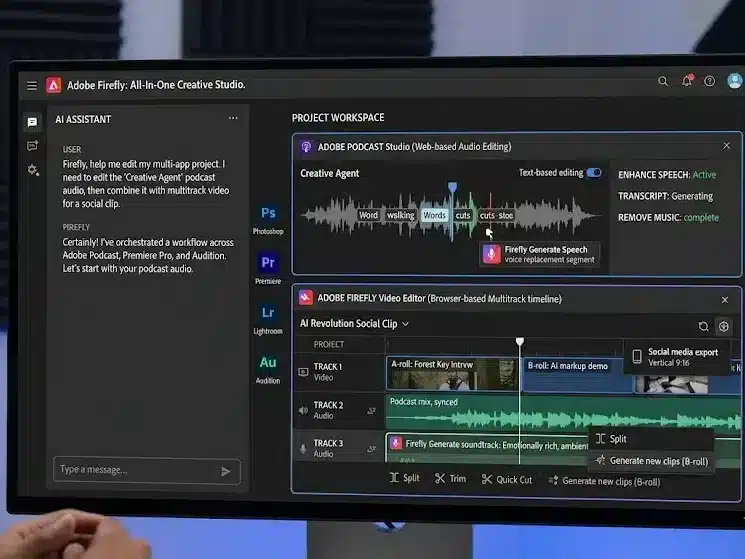
At the heart of Adobe’s latest innovation push lies the introduction of the Firefly AI Assistant — a conversational interface designed to transform how creators interact with software tools.
Rather than manually navigating multiple applications, users can now describe their creative vision in natural language. The assistant then executes multi-step workflows across popular Adobe tools such as:
Adobe Photoshop
Adobe Premiere Pro
Adobe Illustrator
Adobe Express
This approach marks a fundamental shift toward what Adobe calls “agentic creativity” — a model where AI acts as an intelligent collaborator rather than just a tool.
Maintain context across different projects and applications
Provide real-time suggestions while users work
Keep creators in full control of final outputs
According to Adobe, the goal is to dramatically reduce the gap between imagination and execution.
“Adobe is leading the shift into a new era of agentic creativity, where you direct how your work takes shape and your perspective, voice and taste become the most powerful creative instruments of all,” said David Wadhwani, President of Creativity & Productivity Business at Adobe.
The Firefly AI Assistant is expected to enter public beta in the coming weeks, making it accessible to a broader user base eager to experiment with AI-assisted creation.
Adobe Podcast Gets a Major Overhaul
While Firefly represents the broader AI strategy, Adobe is also making targeted improvements to its podcasting ecosystem.
The latest updates to Adobe Podcast focus heavily on enhancing audio clarity, editing precision, and multi-format production capabilities.
“We’ve continued investing across Adobe Podcast to make it more powerful, flexible, and creator-friendly,” said Harmony Jiroudek in the official announcement.
Enhanced Speech Tool Gets Smarter and More Flexible
One of the standout updates is a significant upgrade to the Enhance Speech feature — a popular tool among podcasters for improving audio quality.
Key Improvements Include:
Advanced Source Separation Users can now isolate different audio elements such as:
Speech
Background noise
Music
Independent Control Sliders Creators gain granular control over each element, allowing precise adjustments instead of applying a one-size-fits-all filter.
Downloadable Audio Stems Separate tracks (or “stems”) for:
Dialogue
Noise
Background music
This allows creators to export and refine audio in external tools if needed.
Why This Matters
These enhancements are particularly useful for:
Cleaning up recordings with distracting background sounds
Salvaging audio that may include copyrighted or unwanted elements
Achieving professional-grade sound without expensive studio setups
The update reflects a broader trend in content creation where post-production flexibility is becoming essential, especially for independent creators.
Studio Tool Evolves With Video Capabilities
Adobe is also expanding its Studio feature, signaling a clear move toward supporting video podcasts and hybrid content formats.
New Features in Studio:
Integrated Video Recording Users can now record both audio and video directly within the platform.
High-Quality Remote Recording Each participant in a conversation is captured in high fidelity.
Separate Tracks for Each Speaker Every participant’s audio and video are recorded independently.
No Software Installation Required The browser-based system works via a simple shareable link, making it easy to invite guests.
A Game-Changer for Remote Collaboration
This upgrade is particularly valuable in an era where:
Remote interviews have become standard
Distributed teams collaborate across time zones
Video podcasts are rapidly gaining popularity
By eliminating technical barriers, Adobe is making professional-grade recording accessible to a wider audience.
Multitrack Editing Brings Professional Workflow to Creators
Another major addition is multitrack support for both audio and video, which significantly enhances editing capabilities.
What Multitrack Editing Enables:
Upload separate recordings from platforms like:
Zoom
Riverside
Livestream tools
Automatic synchronization of all tracks into a single project
Unified transcript generation for the entire conversation
Precision Editing Made Easy
Once imported, each track can be edited independently. This allows creators to:
Remove interruptions without affecting other speakers
Balance audio levels across participants
Clean up background noise on specific tracks
This level of control was previously reserved for advanced editing software, but Adobe is now bringing it into a more accessible environment.
Meeting the Demands of Modern Content Creation
Adobe’s latest updates reflect broader changes in the content landscape.
Key Industry Trends Driving These Innovations:
Rise of Video Podcasts Creators are increasingly producing content for platforms like YouTube alongside traditional audio platforms.
Demand for Multi-Platform Content A single piece of content often needs to be adapted for:
Social media
Streaming platforms
Websites
Shift Toward Remote Production Distributed teams and virtual interviews are now the norm.
Growing Complexity in Storytelling Modern content often blends:
Audio
Video
Graphics
Interactive elements
Adobe’s integrated approach aims to address all of these needs within a unified ecosystem.
Simplifying Complex Workflows for Creators
One of the central themes of Adobe’s update is reducing friction in the creative process.
With its latest AI-powered features, Adobe is attempting to streamline this process by:
Automating repetitive tasks
Integrating tools across formats
Providing intuitive interfaces
The result is a more efficient workflow that allows creators to focus on storytelling rather than technical hurdles.
Competitive Landscape: Adobe vs Emerging AI Tools
Adobe’s push into AI-driven creativity comes amid increasing competition from:
Standalone AI content tools
Podcast-specific platforms
Video editing startups
However, Adobe’s advantage lies in its deep ecosystem integration, allowing users to move seamlessly between tools without leaving the platform.
By embedding AI directly into its existing products, Adobe is positioning itself as a one-stop solution for creators.
What This Means for Content Creators
For creators, these updates could significantly change how content is produced.
Key Benefits:
Faster production timelines
Higher quality output with less effort
Greater creative control
Reduced reliance on multiple tools
Who Stands to Gain the Most?
Podcasters
YouTubers
Digital marketers
Social media creators
Independent storytellers
The updates make it easier for both beginners and professionals to produce polished, multi-format content.
The Future of AI in Creative Workflows
Adobe’s latest announcements highlight a broader shift toward AI-assisted creativity, where machines handle technical execution while humans focus on ideas.
The concept of “agentic creativity” suggests a future where:
AI acts as a creative partner
Workflows become more intuitive
Barriers to entry continue to decrease
While challenges remain — including ethical concerns and copyright issues — the direction is clear: AI will play an increasingly central role in content creation.
Timeline and Availability
Firefly AI Assistant: Public beta expected in the coming weeks
Adobe Podcast updates: Rolling out gradually to users
Studio video features: Available within the updated platform
Adobe has not yet disclosed full global rollout timelines, but early access is expected to expand quickly.
Final Take: Adobe Bets Big on the Creator Economy
With these updates, Adobe is making a bold statement about the future of creativity.
By combining AI innovation with practical tools for audio and video production, the company is positioning itself at the forefront of the creator economy.
The emphasis on simplicity, flexibility, and control reflects a deep understanding of modern creators’ needs — and a clear strategy to meet them.